
Docs
Pixel Flow user manual and best practices
Find scanning, filtering, image details, library, export, account, and industry workflow guidance by task.
Redeem PRO Access with a Redemption Code
If you already have a Pixel Flow redemption code, you do not need to enter it on the registration page or purchase a plan first. A redemption code is used on the upgrade page to add the corresponding PRO access time to the currently signed-in account.
Before you start, confirm these two things:
- You are signed in to the account that should receive the redeemed PRO access.
- The redemption code is still valid and has not been used by another account.
After a code is redeemed successfully, the access is added to the current signed-in account. You will also need to use this account later to check the expiration time and redemption history.
Step 1: Confirm the Current Account
Open the Pixel Flow side panel, click the Account & Settings menu at the bottom, and enter the settings page. Check the account, PRO status, and expiration time at the top of the page to confirm this is the account you want to use for redeeming PRO access.
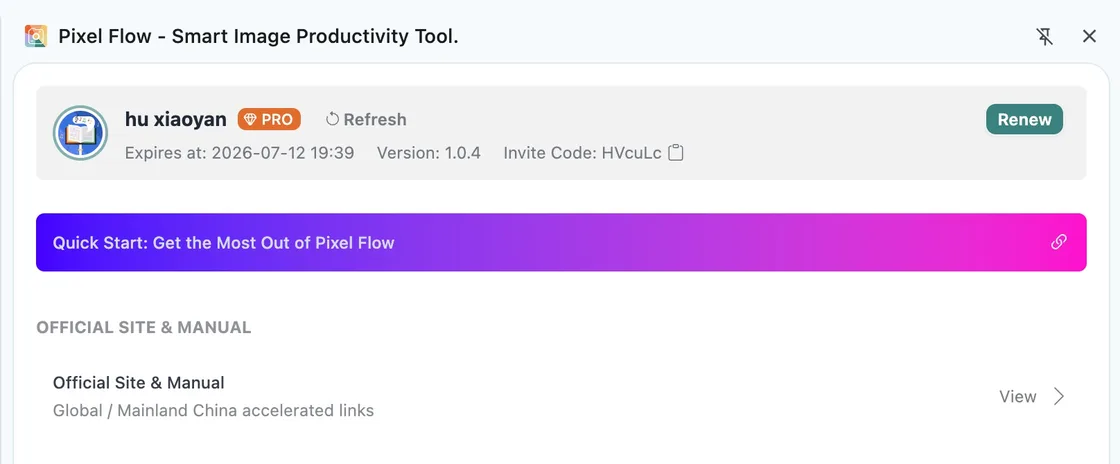
If you use multiple Google accounts or email accounts, sign out of the account that should not receive the redemption first, then sign in with the correct account. A redemption code usually cannot transfer PRO access to another account after it has been redeemed, so make sure the current signed-in account is the one that should receive the PRO access before you redeem the code.
Step 2: Open the Upgrade Page and Find the Redemption Code Entry
At the top of Account & Settings, click Renew or Upgrade Now to enter the upgrade page. Scroll to the bottom of the upgrade page and find the Redemption Code Entry.
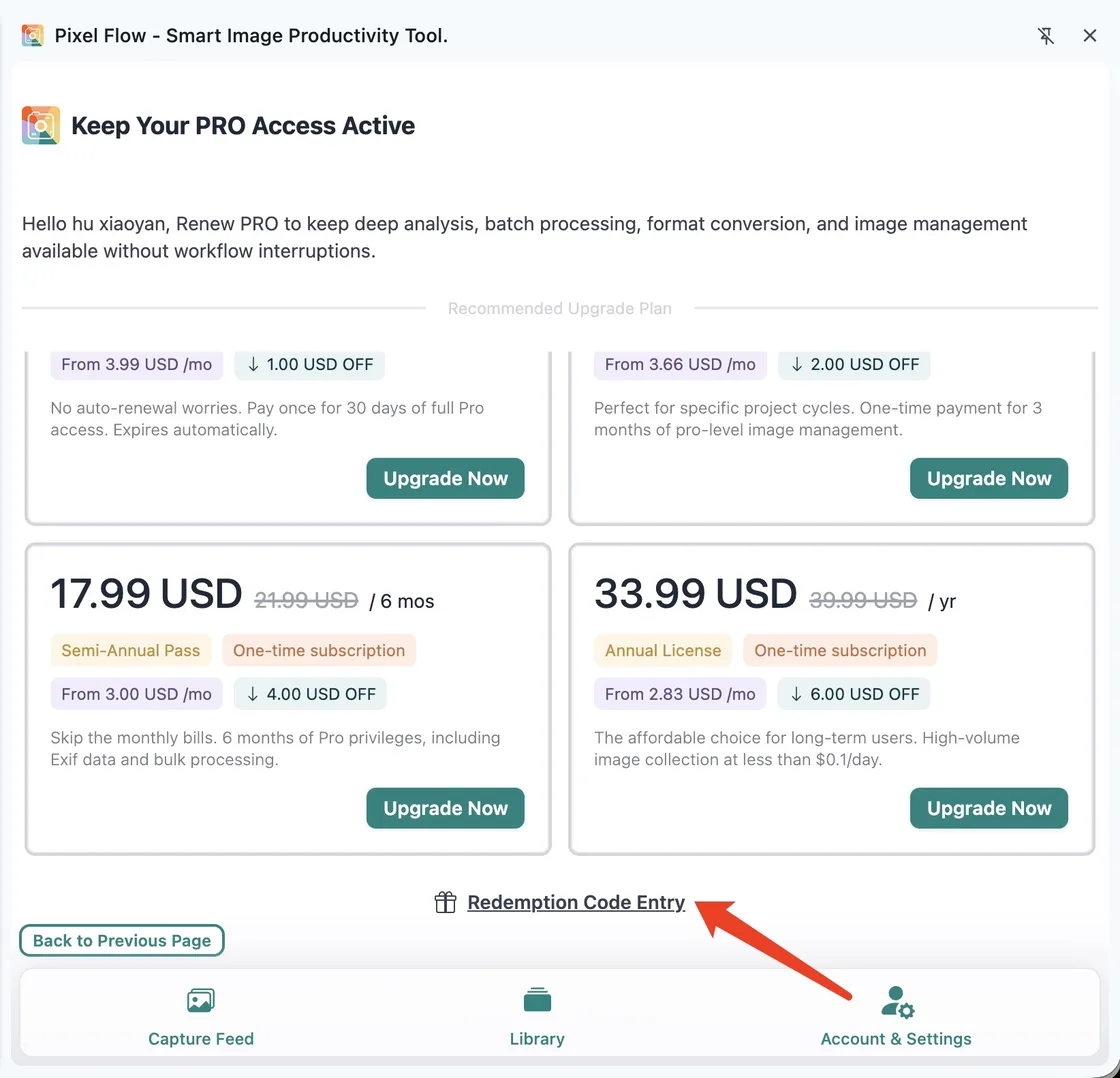
If the upgrade page does not load, check your network connection, close and reopen the side panel, then try again. If you still cannot open it, submit the issue through Contact Support.
Step 3: Enter the Redemption Code and Submit
Click Redemption Code Entry to open the redemption dialog. Enter the code you received, then click Redeem Now.
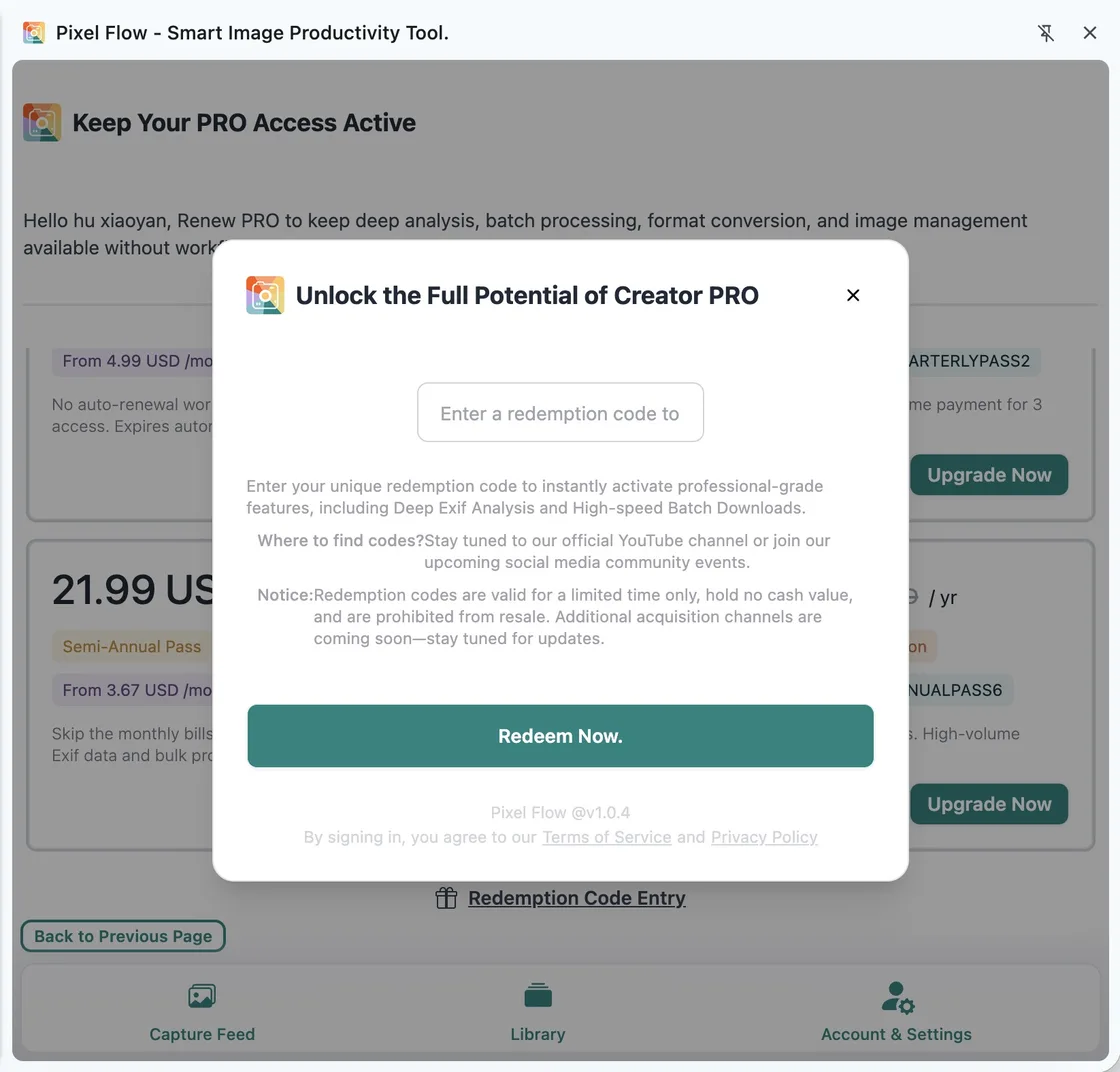
Before submitting, check the following:
| What to check | Why it matters |
|---|---|
| Whether the code is complete | Missing or extra characters can cause redemption to fail. |
| Whether similar letters and numbers were mixed up | Characters such as O and 0, or I and 1, can be easy to confuse. |
| Whether the current account is correct | After redemption succeeds, the access is added to the current signed-in account. |
| Whether the code has already been used | One redemption code can usually be redeemed successfully only once. |
| Whether the code has expired | A redemption code can only be used within its valid period. |
Step 4: Confirm the Access Was Added
After redemption succeeds, return to the top of Account & Settings and check the PRO status and expiration time. If the page does not update immediately, click Refresh in the account area.
Then open View PRO Status and Records and check whether a successfully redeemed code record appears. The record shows the added time, start and end time, creation time, and redemption-code clue.
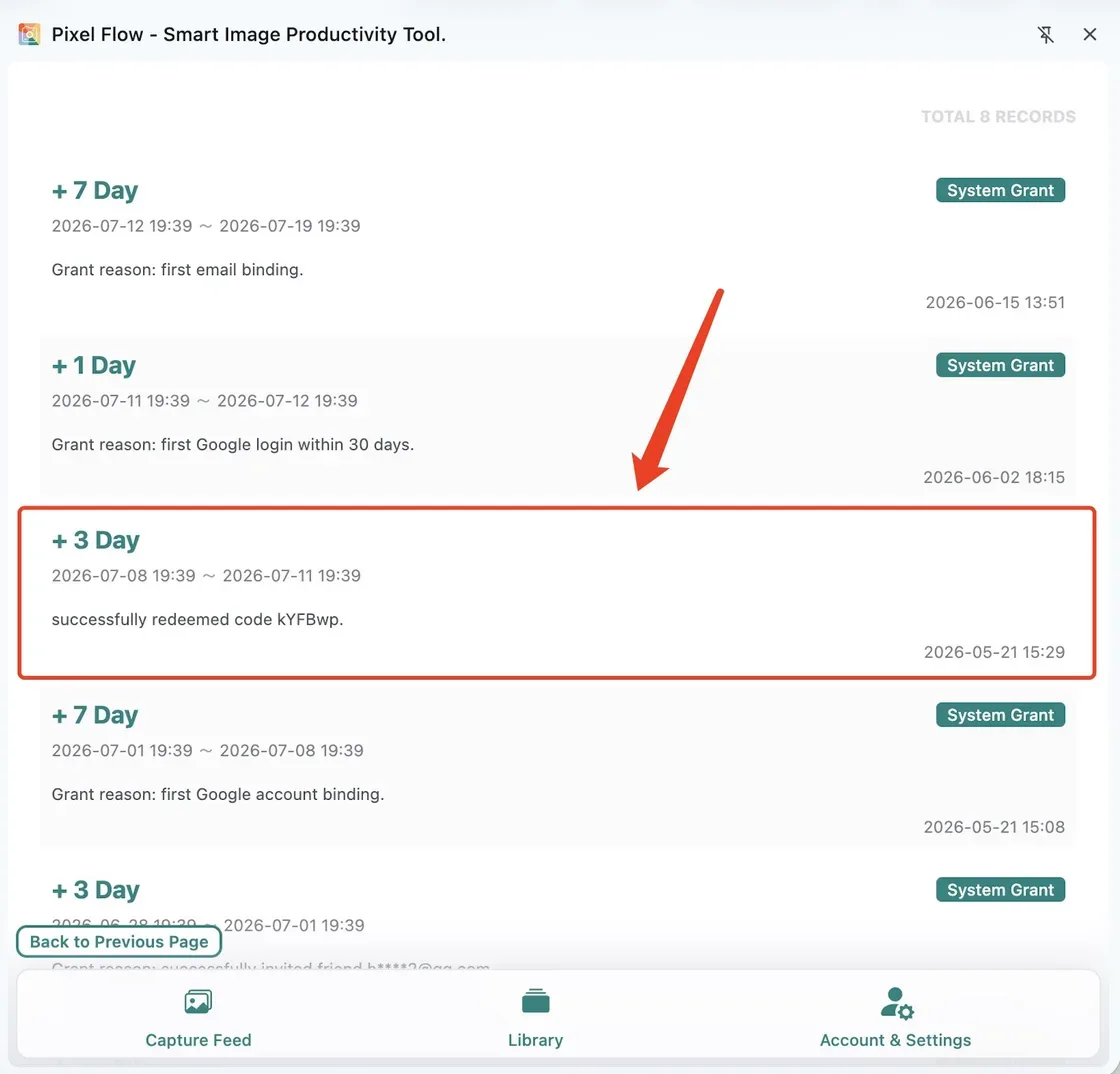
If you were already PRO, the newly added time is appended after your current expiration time. It does not overwrite the access you already had. For example, if your current PRO expiration time is July 12 and you redeem 7 days today, the new 7 days will continue after July 12.
If your PRO access has already expired, the new time usually starts from the successful redemption time. Use the start and end time in the records page as the final reference.
Common Failure Messages
| What you see | What to try first |
|---|---|
| The code does not exist | Check whether any character was typed incorrectly, especially similar letters and numbers. |
| The code has already been used | Confirm whether it was already redeemed by the current account or another account. |
| The code has expired | A redemption code can only be used within its valid period. Expired codes usually cannot be redeemed. |
| The format does not meet the requirement | Follow the page prompt to check the code format, and make sure there are no extra, missing, or whitespace characters. |
| Nothing happens after clicking | Check your network connection, close and reopen the side panel, or try again later. |
| Redemption succeeded but the status did not change | Return to the account area and click Refresh, then open the PRO records page to confirm. |
If the code should be valid but still cannot be redeemed, submit the issue through Contact Support. Include your signed-in account, approximate redemption time, the last few characters of the redemption code, a screenshot of the error message, a screenshot of Account & Settings, and a screenshot of the PRO records page.
Do not send passwords, email verification codes, full payment card details, or other sensitive credentials. Support only needs enough information to verify the account and redemption record.
Redemption Code vs. Invite Code
A redemption code and an invite code are not the same thing.
| Type | When to use it | Where to enter it | Main purpose |
|---|---|---|---|
| Invite code | During first-time registration | The invite-code field on the login or registration page | Creates a referral relationship and grants invite rewards. |
| Redemption code | When you already have a campaign code, gift code, or support-issued code | The Redemption Code Entry on the upgrade page | Redeems PRO access time for the current account. |
For invite-code entry and referral reward rules, see Invite Code and Referral Rewards.
What To Read Next
| What you want to confirm | Continue reading |
|---|---|
| Whether redeemed access was added | View PRO Status and Records |
| Whether the current account is correct | Login Methods |
| Invite-code and referral reward rules | Invite Code and Referral Rewards |
| Redemption failure or account issue | Contact Support |