
Docs
Pixel Flow user manual and best practices
Find scanning, filtering, image details, library, export, account, and industry workflow guidance by task.
Supported Image Formats and What Pixel Flow Can Read
When you see a format label such as JPEG, PNG, WebP, AVIF, GIF, or SVG in image details, treat it first as technical information: it tells you which format the image is saved or transmitted in.
The format itself cannot answer questions such as who owns the copyright, where the image came from, or whether it was generated by AI. But it can help you decide whether to look next at dimensions, source, camera parameters, animation frames, color space, AI fingerprints, or AIGC parameters.
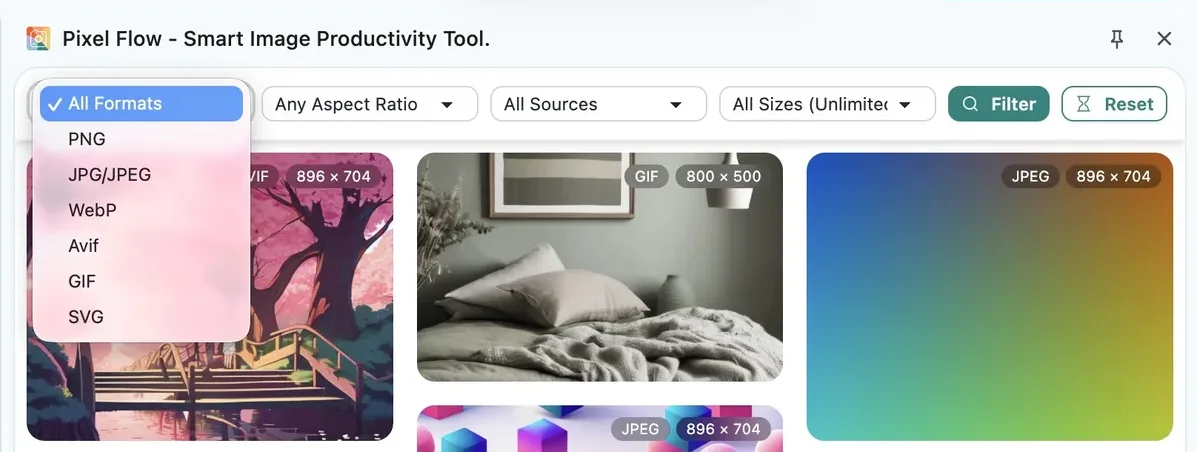
Data Differences Across Six Common Formats
Format is not a conclusion. It is more like a lookup entry point. Different formats may carry different kinds of data, so Pixel Flow may show different detail fields for each one. In the other direction, if you are looking for a certain type of image, you can also start with the formats where that type is more likely to appear.
| Format | Common Use Cases | Data Pixel Flow Highlights | Reading Notes |
|---|---|---|---|
| JPEG/JPG | Photos, product images, event images, web hero images | Dimensions, source, file size, capture parameters, color space, AI fingerprints, AIGC parameters | Useful for capture and lifecycle clues, but platform transcoding may leave only basic information |
| PNG | Screenshots, transparent images, UI assets, design materials | Dimensions, source, transparent-asset context, color space, text metadata, AI fingerprints, AIGC parameters | PNG does not always have capture parameters; many PNGs are software exports or screenshots |
| WebP | Web-compressed images, product thumbnails, modern site images | Transparency, animation status, compression mode, source, color space, AI fingerprints, AIGC parameters | WebP may be a website’s automatic transcode rather than the creator’s original saved format |
| AVIF | Highly compressed web images, modern-browser preferred images, possible high-bit-depth images | Animation status, color space, source, AI fingerprints, AIGC parameters | AVIF is newer, so parsing completeness depends on the browser, encoder, and file itself |
| GIF | Reaction images, simple motion graphics, looping animation | Frame count, total duration, average delay, loop mode, 8-frame sampling, color distribution | GIF is better for animation structure, not camera parameters or rights status |
| SVG | Icons, logos, vector illustrations, inline page vectors | Path complexity, hierarchy depth, editor redundancy, accessibility, vector AI clues | SVG is vector code, not a camera photo, so do not expect camera EXIF |
Pixel Flow currently focuses on the common web image formats listed above. For HEIC, TIFF, BMP, and other formats that are less widely used on web pages, Pixel Flow may only show limited basic information and may not provide full deep analysis results yet. If these formats are important to your workflow, email [email protected] and describe your use case.
Why the Detail Format Can Differ from the File Extension
Images on the web are not always served in the format shown by the filename extension. Many websites temporarily convert the same image into WebP, AVIF, PNG, or another format that is better suited for delivery, depending on browser support, device size, loading speed, or image-service settings.
So you may see cases like these:
- A link looks like
.jpg, but image details show WebP. - An image URL has no obvious file extension, but image details can still identify PNG, AVIF, SVG, or another format.
This usually is not a detection mistake. Pixel Flow is showing the image format the browser actually received.
- If you are only filtering, downloading, or organizing web assets, you can usually rely on the format identified in Pixel Flow image details.
- If you need to confirm the image’s original upload or saved format, go back to the source page or ask the asset provider.
- If licensing, client delivery, or publishing requirements are involved, follow the license notes, contract terms, or delivery specifications.
Why Some Fields Are Empty
The table above shows what different formats may commonly carry, but not every image keeps those fields intact. If you see empty fields in image details, it does not necessarily mean Pixel Flow parsed the image incorrectly. These are more common reasons:
| What You See | Common Reason | What You Can Do |
|---|---|---|
| Format and dimensions are present, but capture parameters are missing | The image is not a camera original, or EXIF was removed by a platform | Review the source page context, and ask the provider for the original file if needed |
| A source page exists, but the image URL looks strange | The image may come from a CDN, dynamic endpoint, or responsive image setup | Combine page title, site name, and image preview instead of relying only on the URL |
| WebP/AVIF has no generation parameters | It may be a website transcode, not a file exported directly from a generation tool | Check AI fingerprint and AIGC parameter pages; no detection does not prove human creation |
| GIF has no copyright or camera fields | GIF is usually an animation-frame format, not a main carrier for photo metadata | Focus on frame count, total duration, colors, and source page |
| SVG has no capture parameters | SVG is vector code, not a camera imaging file | Focus on path complexity, redundant information, and accessibility fields |
| Deep fields are locked | Some analysis items require login or PRO access | Use basic information first, then unlock deep fields if the image is worth analysis |
Viewing Deep Analysis Data Requires PRO Access
Format, dimensions, source page, and basic information are first-layer clues for deciding whether an image is worth processing, and all users can view them. Deep analysis reads further into the file, such as capture parameters, color space, AI fingerprints, AIGC parameters, animation-frame previews, or vector complexity. These data points usually need extraction and analysis before they can be shown, so they require PRO access. See Free vs PRO feature comparison for details.
JPEG, PNG, WebP, AVIF, GIF, or SVG cannot by itself prove image source, author, licensing scope, or commercial-use permission. Before publishing, client delivery, ad placement, dataset preparation, or redistribution, review the source page, license files, contract terms, and your team’s approval rules together.
Continue with the Image Analysis Dictionary
If you want the broader explanation of what format, metadata, AI clues, and source records mean in image details, return to the Image Analysis Dictionary:
Technical Standards Are Pixel Flow’s Reference Background
These technical-standard links explain formats and web resource identification. They are not Pixel Flow feature commitments. If you are not a technical reader, you can skip this section.
- HTTP Content-Type field, RFC 9110
- Google WebP format documentation
- Alliance for Open Media AVIF specification
- W3C PNG specification
- W3C SVG specification