
Docs
Pixel Flow user manual and best practices
Find scanning, filtering, image details, library, export, account, and industry workflow guidance by task.
Fan Community Image Archive: From Saving and Tagging to Sharing and Retention
For fan communities, the hard part is usually not “there are no images.” It is that there are too many images, scattered across too many sources, moving too quickly. Official accounts, agency posts, brand campaign pages, show materials, red carpet photos, media coverage, fansite photographer images, airport photos, screenshots, posters, and fan support assets can all appear within a short period of time. If everything is saved only into albums, chats, and temporary folders, it quickly becomes hard to tell which image is an official high-resolution release, which one came from a fan photographer, which one is suitable for public reposting, which one should stay private, and which one needs attribution or a usage reminder.
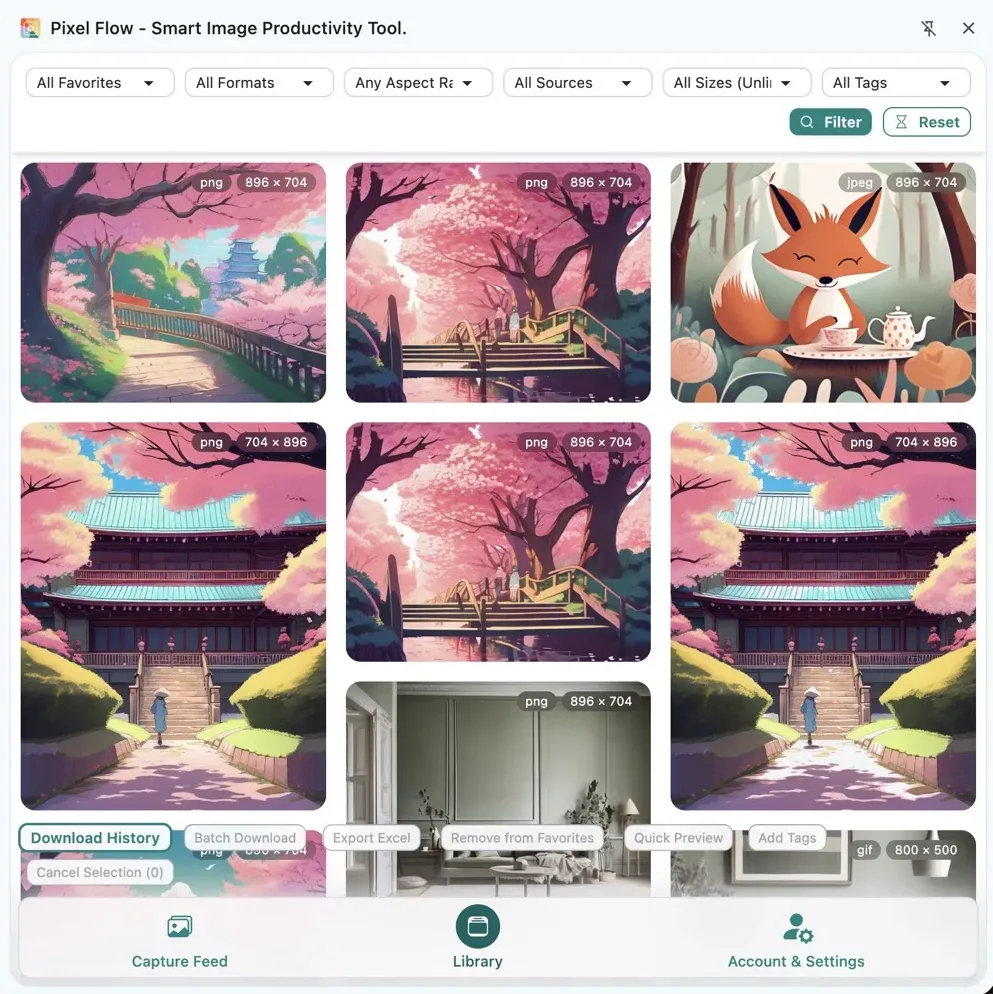
Pixel Flow can turn that into a lightweight fan archive workflow: filter important images from webpages and social pages, favorite them into the library, use tags to record the person, event, date, styling, source, and sharing status, then export inventories, batch download, or back up the collection when needed. It is not about turning fandom into spreadsheet work. It is about making saving, organizing, and sharing images a little less chaotic.
Pixel Flow can help you organize images that are accessible on public or permitted pages, preserve source clues, add tags, and export inventories. It does not automatically grant copyright, portrait, or platform reposting permissions. Official publicity images, brand materials, media images, fansite photographer images, and fan-made works may have different usage boundaries. Before public reposting, editing, printing fan support materials, commercial merchandise, or cross-platform redistribution, review the source notes, creator rules, platform terms, and applicable requirements.
Why Fan Image Organization Needs a Tool
Saving fan images can feel casual: you see a photo you like, save it, repost a high-resolution version, or create an album for a campaign. But if you help run a topic community, organize a fan archive, prepare image packs, create introduction posts, support a birthday project, review an event, or preserve long-term materials, the problems become very concrete.
- One event can include official retouched photos, brand materials, media images, onsite photos, GIFs, and screenshots, all with filenames that are hard to distinguish.
- One image may exist as a watermarked version, non-watermarked version, compressed version, high-resolution version, cropped version, or edited fan version.
- Images are often scattered across social posts, official sites, brand pages, show pages, news pages, fan community posts, and fansite pages.
- Before sharing, you may need to know which images are suitable for public reposting, which should stay internal, and which must keep attribution or the original link.
- Months later, finding “that landscape photo from that styling at that event” can be painful if everything depends on album timelines.
- When making introduction posts, birthday image packs, or event recaps, collaborators need the source, date, tags, and image files together.
Pixel Flow is useful at the “image material organization and reviewable retention” layer. It does not decide who owns the rights, but it helps you stop relying only on screenshots, memory, and chat history.
Suitable Fan Tasks
Organize publicity images, posters, campaign images, and news images released by agencies, studios, brands, programs, platforms, or official accounts.
Preserve images by red carpet, concert, fan meeting, livestream, endorsement, magazine, variety show, airport, or other event contexts.
Select candidate images for timelines, styling collections, memorable moment posts, birthday projects, and social introduction posts.
Keep sources, attribution, tags, usage reminders, and backups before distributing image packs, reducing lost originals and accidental misuse.
Recommended Workflow
- Open an official account page, brand campaign page, show page, news release, fan topic post, or fansite archive page.
- Scroll the page first so lazy-loaded images, long images, albums, and lower page modules are visible.
- Use Capture Page Images in Bulk to read images that are already loaded on the current page.
- In Capture Feed, filter out avatars, stickers, buttons, logos, navigation icons, low-resolution thumbnails, and unrelated decorative images.
- Narrow the set by size, ratio, format, and source. Prioritize high-resolution images, event main visuals, clear subject images, posters, and traceable sources.
- Use Quick Preview to compare clarity, composition, subject completeness, watermark status, and whether an image is suitable for public sharing.
- Favorite only the images that truly need retention. Do not push every page image into the library.
- Use tags to record person, event, date, styling, source type, and sharing status.
- Open Image Details to review the source page, image URL, format, dimensions, alt text, operation footprint, and available metadata.
- When handing materials to archive members, video editors, copywriters, or fan support teams, export an image inventory or batch download with source and usage reminders.
How To Classify Images
Fan image packs become messy when different source types are mixed together. Start by separating source type and usage status instead of sorting only by whether an image looks good.
| Image type | Clues to record | Sharing reminder |
|---|---|---|
| Official publicity image | Official account, agency or studio, brand page, show page, publish time, event name | Usually easier to repost publicly, but still check the original post, platform rules, and watermark requirements |
| Brand and campaign material | Brand name, endorsement event, release channel, poster version, usage context | Do not assume it can be used for homemade merchandise, commercial printing, or reposting without attribution |
| Media news image | Media outlet, article URL, photographer or rights clues, publish time | Useful for source indexing; public reposting and editing need extra care |
| Fansite or fan photographer image | Creator name, original post link, no-edit/no-commercial/no-repost rules, watermark status | Respect creator rules, keep attribution and the original link, and do not crop out watermarks |
| Fan-made work | Creator, permission note, original material source, editing scope | Check whether the creator allows reposting, edits, or redistribution before sharing again |
| Screenshot and GIF | Video source, timestamp, show or livestream name, clarity | Consider platform, program, and editing rules |
The point of this table is not to make every fan action heavy. It is to keep source and usage boundaries from disappearing when images will be distributed to many people, preserved long term, or used in public content.
Recommended Tags
Tags should be short, stable, and easy to filter. You can adapt them to your own community, but try to cover these categories:
| Tag type | Examples | Purpose |
|---|---|---|
| Person or group | artist-a, group-b, duo-stage | Filter across multi-artist, multi-member, or group archives |
| Event context | red-carpet, concert, brand-event, magazine, variety-show, livestream | Review images by scene type |
| Date or period | 2026-07, tour-shanghai, birthday-month | Find materials from a specific time |
| Styling and content | white-suit, black-gold-stage, profile, full-body, poster | Useful for intro posts, styling collections, and video covers |
| Source type | official-image, brand-material, media-image, fansite-photo, fan-made | Keep different rights boundaries from being mixed together |
| Sharing status | public-repost-ok, keep-credit, private-only, no-edits, pending-check | Make the next sharing decision easier |
For example, a red carpet image released by an official studio could use artist-a, red-carpet, 2026-07, official-image, and public-repost-ok. If a fansite photographer says no edits, add fansite-photo, keep-credit, and no-edits so it is not accidentally used in a poster or fan material.

Where Pixel Flow Fits
Creating an Event Image Pack
Scan images from official accounts, brand pages, event pages, and media coverage. Favorite high-resolution images with clear subjects and traceable sources. Use tags for event name, date, person, source type, and status. Before distributing the image pack, export an inventory to check whether it includes no-repost fansite images, unclear-source images, or images that should stay internal.
Making an Introduction Post or Styling Collection
Use tags to separate images by styling, scene, period, and image role, such as red-carpet, stage, magazine, full-body, or expression. Before creating the post, filter candidate images in the library, then return to Image Details to review source and dimensions. Prioritize clear-source, stable-quality images that are suitable for public display.
Sharing Materials With Fan Support or Editing Teams
Do not send only a folder of images. A better handoff includes both the image package and a source inventory, so collaborators know which images are official, which are media images, which need attribution, and which are not suitable for edits. Video editors, copywriters, designers, and reviewers then work from the same material set instead of rebuilding sources from chat history.
Preserving Materials From a Specific Period
Use tags for month, event, channel, and source type. Periodically clean duplicate images, low-resolution images, and expired temporary candidates. Important materials can be protected with Backup and Migration. Pixel Flow is not about hoarding unlimited images; it helps you find out, years later, where an image came from, why it was saved, and how it was suitable to use at the time.
Compliance Notes Before Sharing
Fan communities often receive many official images from agencies, studios, brands, and programs precisely because those images are meant to support promotion, sharing, and community joy. But “officially released” does not mean every usage is unlimited. Cross-platform reposting, edits, watermark removal, printed materials, paid merchandise, commercial use, and large-scale redistribution can all have more complicated boundaries.
Before sharing, check at least:
- Whether the original post allows reposting, editing, moving to another platform, or use in fan support materials.
- Whether watermarks, attribution, original links, hashtags, or post captions need to be preserved.
- Whether a fansite photographer, photographer, or fan creator states no edits, no commercial use, no reposting, or no watermark cropping.
- Whether the image includes minors, bystanders, license plates, addresses, chats, ticketing information, or other private information.
- Whether brand materials are only suitable for publicity reposting and not for homemade paid merchandise, commercial printing, or ads.
- Whether media images, program screenshots, drama stills, or magazine images involve media, program, or platform rights.
Sharing joy still needs boundaries. Pixel Flow records source clues, tags, and operation footprints. It does not mean images can be freely reposted, edited, commercialized, or printed.
Official material organization, event image packs, public material indexes, intro-post candidates, internal collaboration inventories, and long-term fan archives.
Cross-platform reposts, edited posters, video covers, birthday projects, offline fan support materials, public image-pack distribution, and multi-person collaboration should follow source requirements.
Do not crop watermarks, impersonate creators, remove attribution, publicly distribute no-repost images, or use fan-made works, media images, and brand images directly for paid merchandise.
For a broader explanation of image-use boundaries, continue with Responsible Use.
What You End Up With
A healthy fan image organization plan should not end as an ever-growing album. It should leave you with a set of materials that can be found, explained, and shared:
- Image files or favorite records.
- Source pages, original post links, or image URLs.
- Tags for person, event, date, styling, source type, and sharing status.
- Attribution, original-link, no-edit, no-commercial, or private-only reminders when needed.
- Exported image inventories or image-pack notes.
- Local backups and archived materials for important events.
When someone needs to find an image, create a collection, hand off materials, or review a period later, they do not have to dig through albums, cloud folders, chat history, and topic community search again. They can continue maintaining and sharing from an archive with sources, tags, and status.